

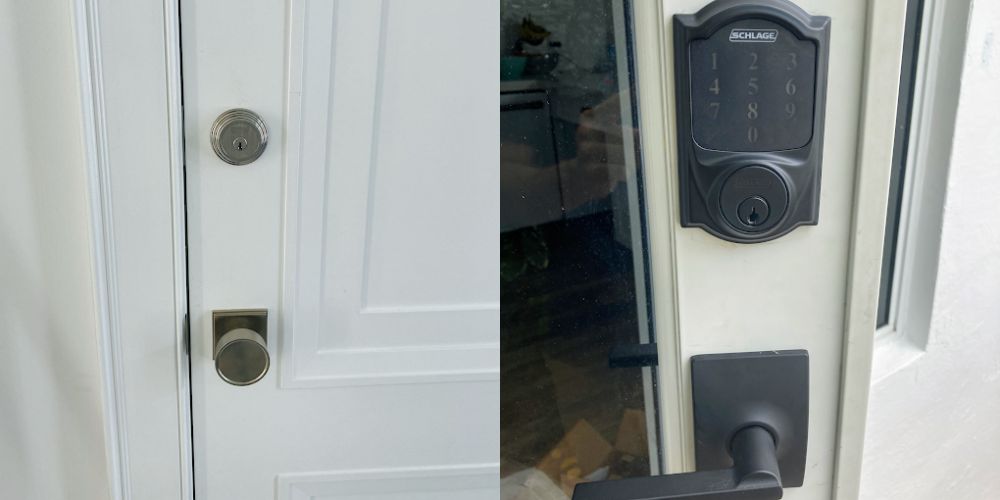
Your front door is one of the first lines of defense against unwanted entry. Traditional deadbolt locks have protected homes for many years. They are strong, simple, and reliable. Today, smart locks let you unlock your door with a phone, passcode, fingerprint, or other keyless options.
As more homeowners switch to smart locks, many wonder whether they are actually safer than a traditional deadbolt or simply offer more convenience. In this article, we’ll look at how each lock works and what makes one a better choice depending on your needs.
Understanding Traditional Deadbolt Locks
A traditional deadbolt is a simple lock that works without springs. Unlike standard spring-latch locks found on bedroom or passage doors which can be forced open with a plastic card or small knife, a deadbolt can only be moved into place or retracted using a physical key or a manual turn-knob inside the house.
How a Deadbolt Works
When you turn the key in a deadbolt, a heavy metal bolt extends deep into the door frame (usually about one inch). The bolt slides into a metal plate attached to the door frame. Since the bolt locks into place without springs, it is much harder to force open.
Types of Traditional Deadbolts
- Single-Cylinder Deadbolts: These feature a keyhole on the outside and a thumb-turn knob on the inside. They are the most common deadbolts in residential homes.
- Double-Cylinder Deadbolts: You need a key to unlock these locks from both sides. While they offer higher protection against someone breaking a nearby glass window to reach inside and turn the lock, they can make it harder to get out quickly during a fire or other emergency.
- Vertical Deadbolts (Rim Locks): These attach to the top or side of the door surface and lock vertically into a surface-mounted strike box. They are harder to force open.
Pros of Traditional Deadbolts
- Proven Durability: Made from strong steel or brass, these locks can handle hard hits.
- No Power Needed: They do not use batteries or electrical wiring. They keep working even when the power is out.
- Budget-Friendly: High-quality mechanical deadbolts are affordable to buy and easy to replace.
- No Hacking Risk: Traditional locks are not connected to the internet, so hackers cannot unlock them.
Cons of Traditional Deadbolts
- Key Management: You must carry physical keys everywhere. If you lose your keys, you may need a locksmith to change or replace the lock.
- No Access Tracking: You cannot see who unlocked your door or at what time.
- No Remote Control: If you forget to lock the front door on your way to work, you have to turn around and drive back home to lock it manually.
Understanding Smart Locks
A smart lock is an electronic lock that replaces or works with a regular deadbolt. Instead of using only a key, a small motor locks or unlocks the door after it gets the right signal.
How Smart Locks Operate
Smart locks connect through Bluetooth, Wi-Fi, or other wireless connections. You can send access signals through several methods:
- Entering a numerical PIN on a touchscreen keypad.
- Tapping a button inside a smartphone application.
- Using your fingerprint.
- Using a key fob or RFID card.
- Some smart locks unlock automatically when your phone is nearby.
Most smart locks also have a hidden key slot in case the battery or electronics stop working.
Pros of Smart Locks
- Keyless Convenience: You never have to worry about getting locked out because you left your house keys inside.
- Remote Access Control: You can lock or unlock your front door from anywhere in the world using your phone, as long as your lock is connected to home Wi-Fi.
- Guest Access Codes: You can create temporary or scheduled passcodes for family members, house sitters, cleaners, or delivery drivers without giving out physical keys.
- Activity History: The app shows when your door was opened and which code was used.
- Smart Home Integration: They sync easily with video doorbells, home alarm systems, and voice assistants like Amazon Alexa or Google Assistant.
Cons of Smart Locks
- Needs Battery Power: Smart locks use AA batteries or rechargeable batteries. If the batteries drain completely, the electronic keypad stops working.
- Potential Cyber Risks: Unsecured Wi-Fi networks or outdated lock firmware can leave doors vulnerable to software exploits or signal jamming.
- Higher Cost: Smart locks cost significantly more to buy and can require professional installation or setup.
- Weather Sensitivity: Heavy rain, extreme freezing temperatures, or direct heat can affect touchscreens, battery life, and electronic sensors.
Physical Security Comparison
A strong lock is one of the most important parts of home security. If a burglar attempts to kick down your door or pick the lock cylinder, which lock stands up better?
Deadbolts and Physical Strength
Lock strength is measured by an ANSI/BHMA grade:
- Grade 1: The highest level of residential and commercial security. Built to handle strong impacts and heavy use.
- Grade 2: Standard residential security designed to resist moderate impact and everyday wear.
- Grade 3: Basic protection found on many new homes.
A standard Grade 1 mechanical deadbolt provides top-tier physical security. Its strong metal bolt helps resist cutting, drilling, and forced entry.
Are Smart Locks Strong?
Here is a fact that surprises many homeowners: Many smart locks use the same strong deadbolt as traditional locks.
When you buy a name-brand smart lock from a reputable manufacturer, the interior deadbolt bolt, latch, and strike plate are often identical in strength to a classic lock. In fact, many smart lock models carry ANSI Grade 1 or Grade 2 ratings.
Verdict on Physical Security: They are tied. A Grade 1 smart lock offers the same physical resistance against kick-ins and forced entry as a Grade 1 traditional deadbolt. The main difference is how someone could gain access without breaking the door.
Digital Security vs. Mechanical Weaknesses
Even if both locks are equally strong, the ways they can be bypassed are different.
Traditional Lock Vulnerabilities
- Lock Picking and Bumping: Experienced thieves can use lock picks or specialized bump keys to align the internal pin tumblers and open standard mechanical cylinders in seconds.
- Key Duplication: Anyone who borrows your key for a short time can easily copy it at a local hardware store kiosk.
- Human Error: The single biggest vulnerability of a mechanical deadbolt is human forgetfulness. A lock provides zero protection if you forget to turn the key before leaving home.
Smart Lock Vulnerabilities
- Cyber Threats and Hacking: Cheap, unbranded smart locks often lack end-to-end data encryption. Hackers can intercept Bluetooth signals or breach poor app security to send an unlock signal to your door.
- Network Drops: If your home Wi-Fi network goes down or your internet router loses power, remote controls and instant app notifications stop working.
- Weak User Credentials: If you use simple keypad codes like 1234 or use weak passwords for your smart home app account, unauthorized people can guess their way inside.
- Power Outages: When batteries run flat, keyless entry methods become unresponsive until you apply a backup power source (like a 9V battery touching emergency terminals) or use a manual mechanical key.
Which Option Offers Better Security for Your Home?
The better choice depends on your daily routine and what features matter most to you.
Choose a Traditional Deadbolt If:
- You want a proven, low-cost locking system that never requires battery changes or software updates.
- You do not like connecting home entry points to Wi-Fi networks or smartphone apps.
- You prefer maximum simplicity and do not mind carrying physical keys.
- You are looking for high-security commercial-grade mechanical cylinders that feature anti-pick and anti-drill pins.
Choose a Smart Lock If:
- You frequently worry about whether you remembered to lock the front door after leaving home.
- You have children, relatives, service workers, or rental guests who need entry without making extra copies of physical keys.
- You want real-time notification alerts whenever your door opens or closes.
- You already use a smart home security system and want integrated door controls.
Final Verdict
When comparing a traditional deadbolt to a smart lock, neither system is entirely immune to security risks. Traditional deadbolts don’t rely on apps or batteries, but they can still be picked, keys can be lost, and people sometimes forget to lock them. Smart locks make access easier and let you control your door remotely, but they also depend on batteries and software that need regular maintenance. If both locks have an ANSI Grade 1 rating, they offer similar protection against forced entry.
The right choice depends on how you use your home and what matters most to you. If you want remote access, activity logs, and temporary codes for guests, a quality smart lock is worth considering. If you prefer a simple lock without apps or electronics, a high-quality deadbolt is still a reliable option. If you are still unsure which locking mechanism fits your door frame and security needs, feel free to contact us for personalized recommendations.